Three n8n workflow templates. £39 each — £99 for all three.
The exact automations running social media daily for a real 325-customer service business — sanitised, documented, yours to import.
Built for our business — they run for any: the workflows post whatever content you feed them, whatever you sell. Delivered instantly by email — sent, naturally, by an automated workflow.
Auto-post Reels to Facebook & Instagram
A theme in a spreadsheet becomes a finished vertical video, posted to a Facebook Page and an Instagram Business account.
- +GPT writes the script from your theme — hook, three beats, subtitles, caption
- +Pulls four portrait clips from Pexels and renders them through a Creatomate template
- +Publishes to Facebook Reels and Instagram, then marks the row posted
Full details
- +Uses Facebook's three-phase resumable Reels upload, and Instagram's create-container-then-publish flow — it waits for processing rather than firing and hoping
- +Model output is validated before anything renders, so a malformed script fails the run instead of publishing a video with blank captions
- +Twenty nodes. Also needs a Pexels key (free) and a Creatomate account (paid, free trial)
- +The workflow JSON, sanitised and import-ready
- +A full setup guide — accounts, API access, every credential, screen by screen
- +A gotchas document: the things that break silently and how to see them coming
Workflow JSON + setup guide + gotchas
Buy now — £39LinkedIn Auto-Poster (3x weekly)
A content bank in a spreadsheet, published to LinkedIn on Monday, Wednesday and Friday.
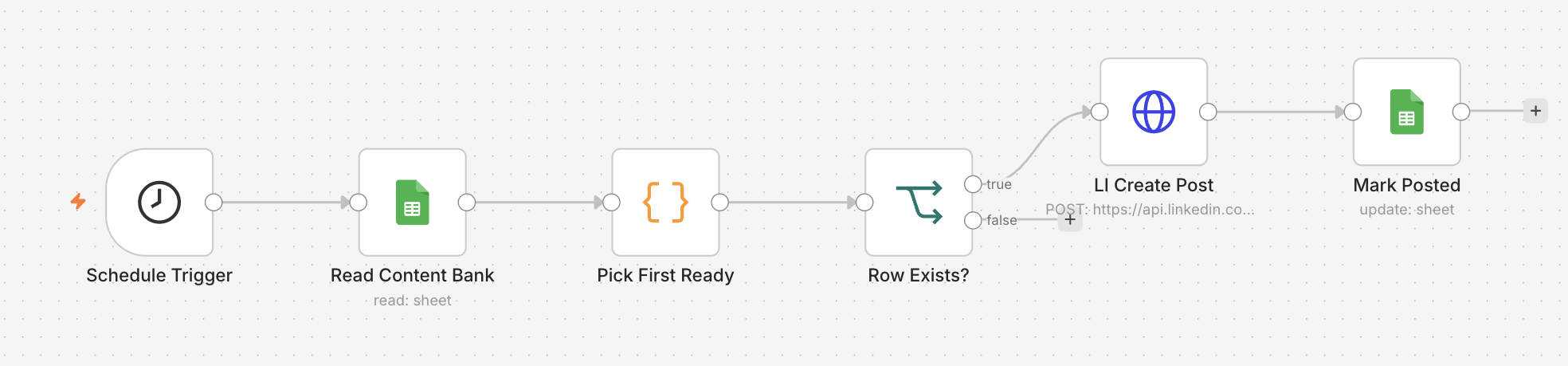
- +Schedule trigger three times a week — days and times are yours to change
- +Takes the next row marked ready, in the order you wrote them
- +Posts to your LinkedIn profile and marks the row posted
Full details
- +Ends quietly when the content bank runs dry rather than posting an empty update
- +Six nodes, and the one that has needed the least attention since we built it
- +Text posts only. For images across three platforms, that is the AI Social Media Agent
- +The workflow JSON, sanitised and import-ready
- +A full setup guide — accounts, API access, every credential, screen by screen
- +A gotchas document: the things that break silently and how to see them coming
Workflow JSON + setup guide + gotchas
Buy now — £39AI Social Media Agent
One line of a spreadsheet becomes three platform-specific captions, a branded graphic, and a post on all three networks.
- +GPT picks the strongest angle and writes a separate caption per platform
- +Generates a branded card image and hosts it publicly on Cloudinary
- +Posts to Facebook, Instagram and LinkedIn in one run
One piece is yours to supply: an endpoint that turns a title into a card image. The guide covers three ways to get one, including dropping the graphic entirely.
Full details
- +Handles LinkedIn's three-call image upload, which is genuinely fiddly, and Instagram's container-and-publish flow
- +Validates the model output hard, so a malformed draft fails the run instead of becoming a post on three platforms
- +Fifteen nodes. Also needs Cloudinary (free tier is ample)
- +The workflow JSON, sanitised and import-ready
- +A full setup guide — accounts, API access, every credential, screen by screen
- +A gotchas document: the things that break silently and how to see them coming
Workflow JSON + setup guide + gotchas
Buy now — £39All three — save £18
Every template on this page, with its setup guide and its gotchas. Bought separately that is £117.
- +Auto-post Reels to Facebook & Instagram
- +LinkedIn Auto-Poster (3x weekly)
- +AI Social Media Agent
All three run off the same idea — a spreadsheet is the queue, a schedule empties it, the row gets marked. Learn it once and the other two stop being intimidating.
Forty-one nodes, three guides
Buy all three — £99Digital download, delivered to your inbox the moment you pay — see cancellation and refunds before you buy. Checkout is handled by Stripe; we never see your card details.
Don't want to do the setup?
Every template comes with a guide, and the guide is genuinely good. The Meta developer app and the API approvals still cost most people an afternoon — that part is slow for everyone, including us.
If you would rather skip it: we install your template on your n8n, or set up a small VPS with n8n on it for you, connect your accounts with you by email, and hand it over running.
From £249 for one template, from £349 for all three. Quoted rather than sold from a button, because the price depends on whether you already have somewhere to run it.
Same rule as everything else here: your accounts, your server, your system. Nothing is opened in our name and nothing keeps running only while you keep paying us.
What you are importing.
The workflow exactly as it arrives, before you have changed a thing. Read the nodes and you already know whether it fits what you run.
LinkedIn Auto-Poster (3x weekly)
A template nobody runs is a screenshot.
Most n8n templates you can download were built to be downloaded. They connect the right nodes in the right order, they look correct on a canvas, and the first time a real API rate-limits you or a token expires at 60 days you find out that nobody ever ran the thing in anger.
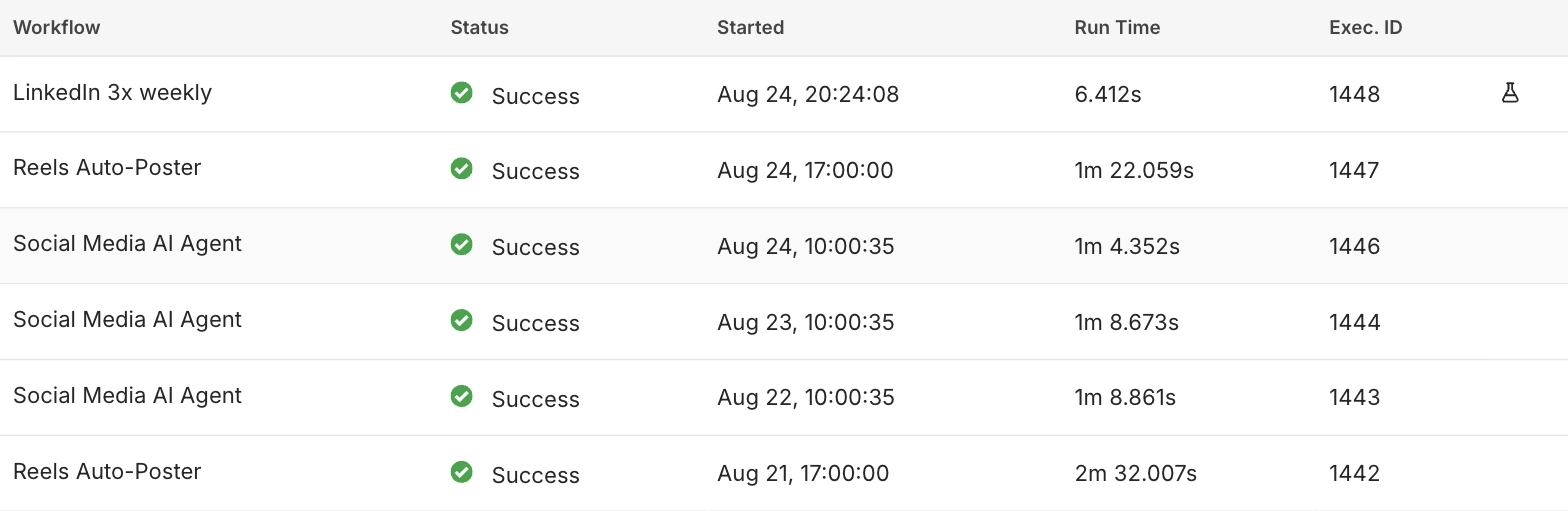
These three have been running unattended in a business we run. Every awkward edge — the Instagram publish that has to be polled, the Facebook token that dies on a schedule nobody warns you about, the timezone that silently shifts your posting slot — has already cost us an afternoon, and the fix is in the workflow.
What you are buying is the afternoons. The JSON is maybe an hour of work to recreate if you already know the platforms. The setup guide is the part that took months, because it is written from the failures rather than from the documentation.
They are also genuinely yours. Import them, read them, change the prompt, rewire the schedule, run them on your own n8n forever. There is no account of ours involved and nothing to keep paying for.
The executions list, not a promise.
What you need, and what you get.
What you need
- Your own n8n. Cloud or self-hosted, either is fine, version 1.60 or newer. These are workflow files you import — they do not come with somewhere to run them.
- Your own platform API access. A Meta developer app with a Facebook Page and an Instagram Business account linked to it, a LinkedIn developer app approved for posting, a Google account for the sheets, and an OpenAI key. All in your name, billed to you, never through us.
- A few third-party accounts, per template. Reels also needs Pexels (free) and Creatomate (paid, free trial). The agent also needs Cloudinary (free tier is ample) and an image endpoint you supply. Listed here rather than discovered after you have paid.
- An afternoon and the setup guide. The import takes a minute. The Meta developer app is the slow part for everyone, including us. That is why the guides are as long as they are.
Delivery
- Delivered instantly by email — sent, naturally, by an automated workflow. One zip per template: the workflow JSON and the written guide, in your inbox in the seconds after checkout.
- Download links last 7 days. Save the files somewhere of your own — and if you come back after they have expired, reply to the receipt and we will send fresh ones.
- Sent to the address you pay with. If you want it somewhere else, reply and say so.
- No account to create, no portal to log into, no licence key. They are files.
Support
- Setup guides are included and they are detailed — written for someone who has not seen the workflow before, including the failures that are silent.
- Email us if you get stuck. We answer.
- What £39 does not buy is us doing the setup for you. If you want that, it is a setup, from £249.
- What neither buys is the workflow rebuilt around your systems. That is a build, and it starts at £750.
Cancellation and refunds
- These are digital downloads. Under UK consumer law you have a 14-day right to cancel — but by purchasing you consent to immediate delivery and acknowledge that this waives the right to cancel once the files have been sent.
- If a template is genuinely broken and we cannot fix it with you by email, we will refund it.
- We would rather refund than leave you stuck.
Workflow automation
When you want it built around your systems rather than adapted to a template. From £750.
Learn more →n8n vs Zapier
What automation actually costs to own, with real pricing and the cases where Zapier wins.
Read the comparison →AI integrations
When the AI step needs to be a proper feature rather than a node in a workflow.
Learn more →Not sure it fits what you run?
Send a short note about the accounts you post from and what you want automated. If a template covers it we will say which one. If it does not, we will tell you that instead of selling you one.
hello@cbwstudio.studio