Automate the work nobody wants to do. Own the system that does it.
Business automation built out of systems that run in production every day. UK-based, working worldwide — everything is async and in writing, so your timezone doesn't matter. Invoices raised and sent, payments matched off against them, posts published on schedule, notifications and follow-ups fired without anyone remembering to. Built on self-hosted n8n running on your own infrastructure — no per-task fees, no business process living inside somebody else's account.
Four kinds of work that should run themselves.
Repetitive admin
The jobs that are identical every time and only happen because someone remembers. Raising invoices, chasing the unpaid ones, filing documents, updating the spreadsheet that feeds something else. A workflow does them on a schedule and does not have an off day.
Data moving between systems
Your booking system, your accounts package, your CRM and your inbox each hold a piece of the same information and none of them talk to each other. Automation is the connective tissue — one record created once, and everything downstream updates without a copy-paste.
Notifications and follow-ups
Messages that need to go out when something happens rather than when someone notices it happened. Enquiry acknowledged, payment confirmed, unpaid invoice chased on day 14 and again on day 28. Written once and sent from then on.
Reporting
The Monday morning summary somebody currently assembles by hand from four different screens. Numbers pulled from the systems that hold them, put together in the same format every week, and sitting in your inbox before you open the laptop.
Typical stack:
Systems we run in our own businesses, every day.
These are not demos built for a portfolio. Every one runs unattended in production, and the same patterns transfer to your systems. If you want to automate invoicing, match payments off against it, or post on a schedule, it is already running here.
Automated invoicing runs
Invoices generated and sent on a schedule from records that already exist, with the right amounts, references and dates. Nobody opens a template and types a number into it.
Payment matching
Incoming payments read and reconciled against outstanding invoices. What matches is marked paid and closed off. What does not match is flagged to a human rather than quietly ignored.
Scheduled social posting
Content queued and published across channels on a timetable, drawn from one source rather than retyped per platform. The calendar keeps running whether or not the week goes to plan.
AI steps inside the workflow
OpenAI nodes sitting mid-workflow, drafting content and pulling structured data out of messy input — an email, a PDF, a form response — so the next step receives clean fields instead of prose.
Email notifications and follow-ups
Alerts when something needs a person, confirmations when something completes, and follow-up sequences that keep to their own schedule without being nudged.

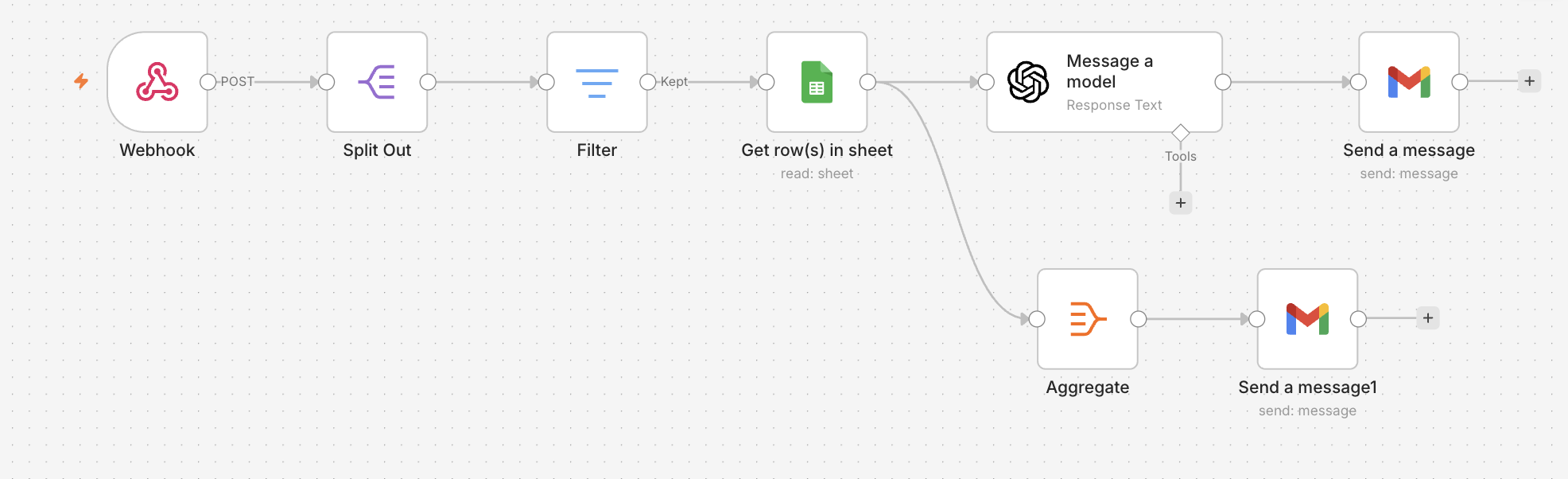
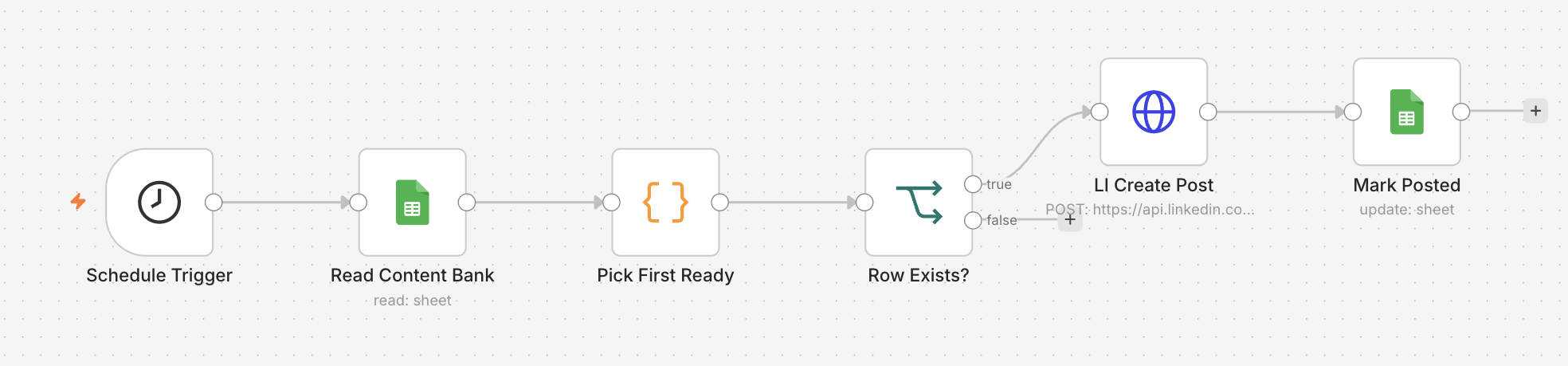
Self-hosted n8n. No per-task fees.
Most automation platforms charge you per task. Every invoice raised, every notification sent, every row moved is a billable event, so the bill grows precisely as the automation becomes more useful. Succeed with it and you get charged for succeeding.
n8n runs on your own server instead. The workflows are yours, the data stays on infrastructure you control, and running something ten thousand times a month costs the same as running it ten. If we stop working together nothing switches off — you own the entire system, exactly as you own the code on every other project we take on.
We work with Zapier and Make as well, and there are cases where they are the right answer: a handful of simple connections, a team already living inside one of them, or a service only they support. If that is you, we will build it there and tell you why.
For everything else n8n is the recommendation, and it is a real Zapier alternative rather than a lateral move. The same connectors, the same webhooks, the same scheduling — without the per-task meter, and without your operations sitting in an account you do not control.
Want the numbers before choosing a platform? Read the worked n8n vs Zapier cost comparison.
The 3-year automation cost guide
Zapier against self-hosted n8n at 1,000, 10,000 and 50,000 tasks a month, over thirty-six months, with the server costs and the build cost both in the total. It also names the volume below which paying us to build it does not pay back — because there is one.
Read the cost guideFixed scope, async, documented handover.
Map the work
You describe the process as it actually happens today, including the parts done by hand. We come back with what is worth automating, what is not, and what each part takes.
Fixed scope and quote
The workflows, the systems they touch, and the price written down before anything starts. 50% deposit to start. No hourly billing and no scope that quietly grows.
Build and prove
Built against your real data and run alongside the manual process until it is provably correct. Error handling included, because a workflow that breaks should say so.
Handover
Written documentation of every workflow, what it does and how to change it. Running on your infrastructure, in your accounts. 50% on delivery, retainer optional.
From £750. Fixed before we start.
Workflow automation starts at £750 and most projects land between £750 and £1,500, depending on how many workflows you need and how awkward the systems they connect to turn out to be. That covers n8n set up on your own server, the workflows built and tested against real data, AI steps where they earn their place, error handling with failure alerts, and a documented handover. Quoted as a fixed price after a short brief, so the number you agree is the number you pay.
Automation questions
Do I need my own server to run this?
Yes, and it costs less than you would expect — a small VPS at a few pounds a month runs a serious amount of automation. We set it up, or deploy onto infrastructure you already have. It stays in your name and billed to your account, exactly like every other account on a project we build.
Is n8n actually better than Zapier for my business?
For most businesses running more than a handful of automations, yes, because the cost does not climb with how much you use it and the workflows are not locked inside someone else's platform. Zapier and Make are genuinely better for a small number of simple connections, or where a team already lives inside one of them. We will tell you which situation you are in before you spend anything.
What happens when a workflow breaks?
It tells you. Every workflow is built with error handling and failure alerts, so a broken step sends a notification instead of stopping quietly. The failure modes worth worrying about are the silent ones, and those get designed out first.
How do you communicate during a project?
Email and written messages throughout. Regular progress updates, you review and reply when convenient. No weekly calls unless you specifically want them.
Automating what happens after the click.
A paid click that turns into an enquiry nobody answers for two days is a click you paid for twice. The same workflows that handle your invoicing will acknowledge an enquiry the moment it arrives, file it where it belongs, and follow it up on a schedule. If you also want the campaigns themselves built, that is a fixed fee too — £95 for an audit, setup from £350, and the ad account opened in your name.
Got a process that runs on somebody remembering?
Send a short note about the task, how often it happens, and which systems it touches today. We reply within one working day. No calls required.
Would rather use plain email? hello@cbwstudio.studio
The workflows on this page, ready to install.
Workflow JSON, a full setup guide and an honest gotchas document. £39 each, or £99 for all three. Right if you have your own n8n and an afternoon — a build is right if you want it fitted to your systems.
Between the two: we install a template on your n8n, or set a server up for you, from £249.
Auto-post Reels to Facebook & Instagram
A theme in a spreadsheet becomes a finished vertical video, posted to both.
See the template →LinkedIn Auto-Poster
A content bank, published to LinkedIn on Monday, Wednesday and Friday.
See the template →AI Social Media Agent
One row becomes three platform-specific captions, a graphic, and three posts.
See the template →